

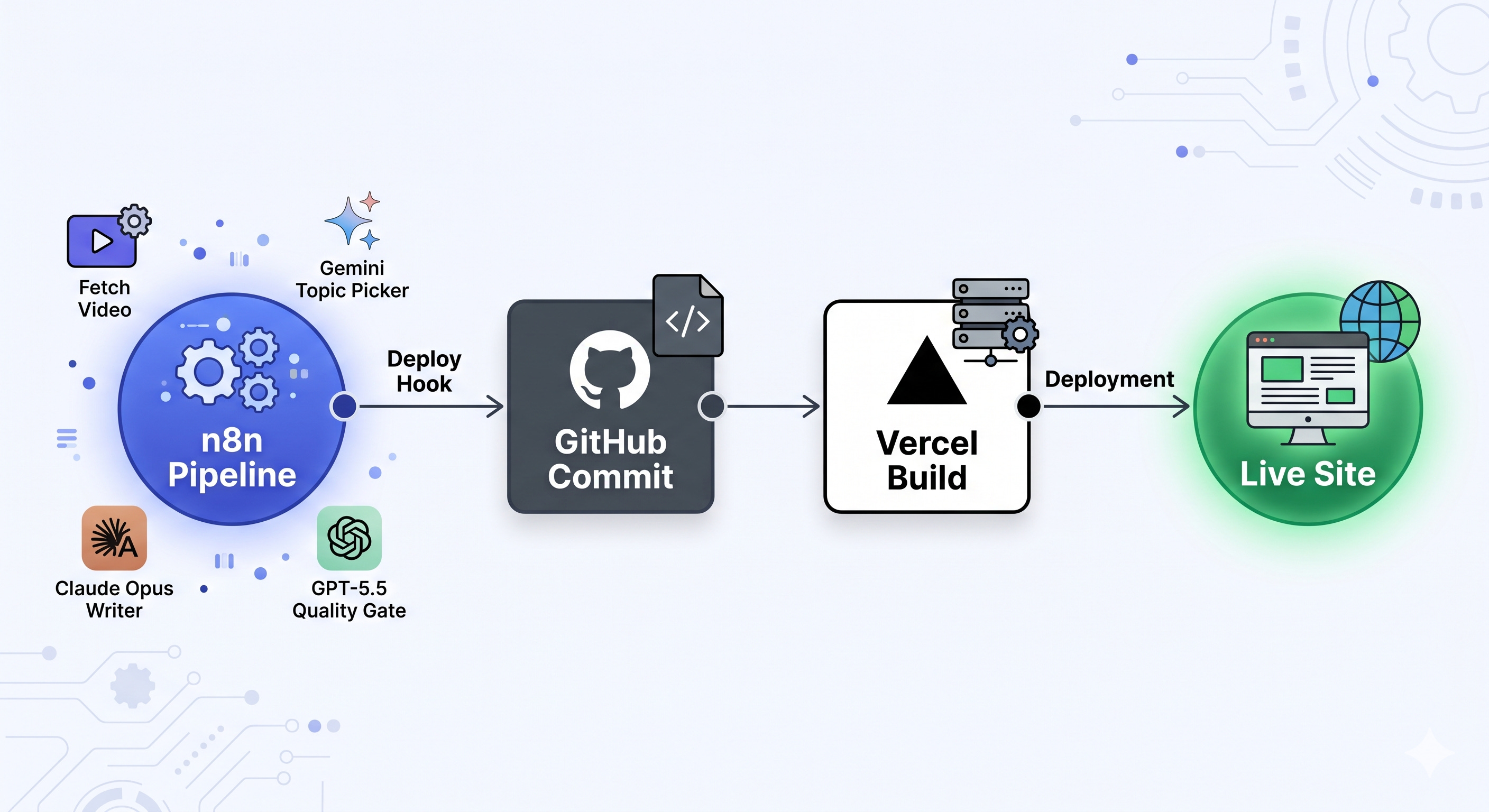
A week ago I shipped the AI blog. Two days of n8n wiring, a GPT-5.5 quality gate, a Claude Opus 4.7 writer, a Gemini topic-picker, and a deploy hook into Vercel. Then I closed the laptop.
Seven days later, the blog has been writing itself.
I haven’t tweaked the prompts. I haven’t bumped the gate threshold or rerouted a node. The pipeline runs every six hours, picks a video from one of the channels I’m monitoring, fetches a transcript, writes a 1,500-word post, scores it on a 40-point rubric, and either ships it or queues it for review. While I sleep. While I’m doing literally anything else.
That part is impressive. But it’s not the most interesting thing I learned this week.
The most interesting thing is what’s hosting the blog.
My blog lives on GitHub
There is no WordPress. No Ghost. No headless CMS. No hosting service with monthly tiers and storage limits and bandwidth overages. No “Editor” UI with logins and permissions to manage.
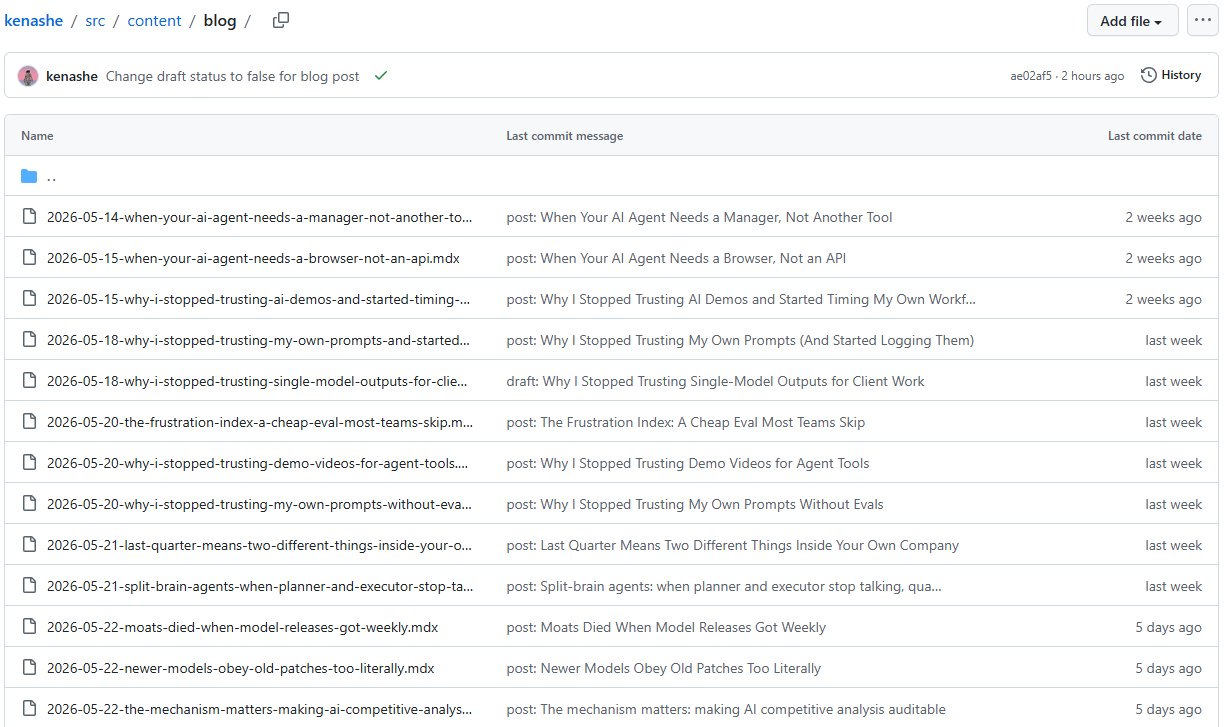
My blog is a folder of files in a Git repo.
That sounds like a small technical detail. It is not. It is the whole reason this build works for a non-engineer on a budget, and I think it’s one of the most underrated patterns for anyone building with AI in 2026.
A normal blog stack looks like this: you pay a hosting service, you log into an admin UI, you write your post in an editor, you click publish, and the hosting service stores your content in a database and serves it to readers. Three or four separate tools, each with its own UI to learn, its own pricing tier, its own way of breaking.
My stack looks like this: I have a GitHub repository. Inside it is a folder called content/blog. Every post is a single MDX file with some frontmatter at the top (title, date, tags) and the post body below. To publish a new post, the AI pipeline writes a file and commits it to the repo. Vercel watches the repo, sees the commit, and rebuilds the site automatically. The post is live in about 90 seconds.
That’s the whole thing. The GitHub repo is the host, the CMS, the editor, the database, and the version control system. One tool, doing the work of five.
What that actually gets you
This is not just elegance for its own sake. It unlocks specific, real-world things.
No hosting bill. Vercel’s free tier handles this kind of traffic comfortably. The only thing I pay for is the LLM tokens to write the posts. The infrastructure is free.
No CMS to wrangle. The schema of a post is whatever I want it to be. Frontmatter at the top, body below, done. If I want a new field tomorrow (say, an aiGenerated: true flag, which I might add), I just add it to the frontmatter. No CMS migration, no plugin compatibility check.
Everything is a commit. Every change to the blog is a Git commit. I can see what changed and when, and I can roll back any post, any edit, or the entire site, with a single command. This is version history that a normal CMS makes you pay extra for, and it’s free here because it’s built into how Git works.
The pipeline can manipulate the site directly. Posts, drafts, edits, deletions, configuration changes, design tweaks: all of it is just files in a folder. The n8n pipeline writes files. I write files. GitHub Copilot writes files. Everything is the same kind of object.
I can edit the blog from anywhere. I made a few edits this week from my phone, in GitHub’s web UI, while waiting in a parking lot. No app to install. No editor to configure. Just a text editor and a “commit” button.
The manual rescue workflow
This was the thing that really sold me on the setup.
Earlier this week, the gate queued a handful of posts that I thought were actually publishable with light touch-ups. In a normal CMS flow, I would have to log into the admin UI, find the draft, edit it in some WYSIWYG editor that may or may not handle Markdown well, click Save, click Publish, and then maybe wait for a cache to clear.
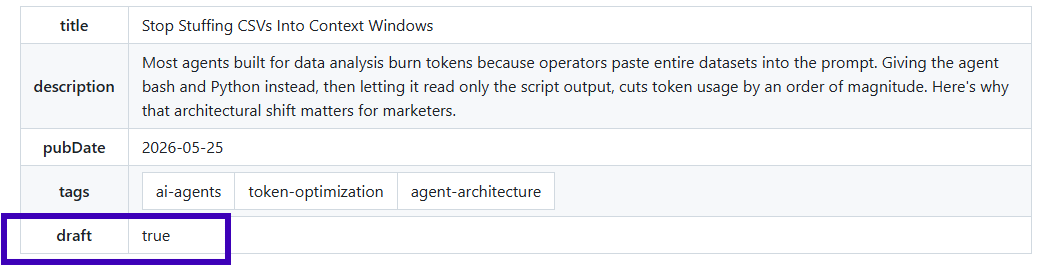
What I did instead: I opened the repo on GitHub, opened the queued MDX file, changed draft: true to draft: false, made a couple of small wording fixes inline, and clicked “Commit changes.” The post was live in 90 seconds.
That whole flow took about a minute per post. No special software. No admin login. Just a web browser and the same GitHub interface I use for everything else. The fact that “publish” is just “flip a flag and commit” is what makes manual rescue practical instead of annoying. I did this two or three times this week with posts I felt were strong enough to go live with minor edits.
And then there’s Copilot
This is where it gets weirder, in a good way.
I’m not a developer. I can read code, sort of. But navigating a real repository, finding the right file, understanding what a commit changed, asking “what does this configuration actually do,” used to be a wall for me.
GitHub Copilot inside github.com has dissolved that wall. I can highlight a file and ask what it does. I can ask why a build failed. I can describe a change I want and have it draft the diff for me. I am operating a software project through plain English, in a browser, as a person who does not write software.
This is the broader pattern I keep running into. Every tool I use is becoming an AI surface. Not “has an AI feature bolted on,” but is, structurally, an AI surface. GitHub is one. Vercel is another. n8n itself is one.
For non-engineers, this is the unlock. The technical depth required to ship something real is collapsing in real time.
What I’m watching
I haven’t tweaked the system this week, partly to see what it does on its own. Seven days in, here’s what I’ve noticed.
The gate is rejecting roughly at the rate I expected. Mostly for unsourced claims and overstated certainty, which is what I tuned it to catch. A few queued posts have been clearly recoverable with small edits, which is how the manual rescues started. The posts that pass the gate read like a smart operator’s notes, not marketing copy. That was the goal of the voice tuning, and it’s holding.
I’ll probably make my first real tweak this week. Or maybe not. One thing I’m learning about building with AI in public is that not touching the thing is sometimes the hardest part of the build.
Real name, no business, no pitch. Just education in public.
Ken